LLMGuard by HACS
How it works, part by part
An agent on each Windows, macOS or Linux device picks out the requests heading for AI services. The Policy Engine, installed on your own hardware, decides each one before it reaches the provider. This page walks through every part, what your administrators see, what gets recorded and where LLMGuard by HACS stops.
- On Windows, macOS and Linux LLMGuard Endpoint Agent Finds the requests going to AI services and carries out each decision
- On your own server LLMGuard Policy Engine Checks every request against your rules and decides it
- Hosted by HACS LLMGuard Registries Publish the signed catalogue of AI services the agents recognise
Content is only ever examined in the Policy Engine. Never on the device, and never at HACS.
01The Endpoint Agent
The agent opens AI traffic and leaves everything else sealed
The agent sits beneath every application, at the network layer of each device, whether it runs Windows, macOS or Linux. When a request heads for an AI service, whichever application sent it, the agent hands it to your Policy Engine for a decision, along with any text, screenshots, documents or files attached to it.
Everything else leaves the device exactly as it did before.
| From | To | What the agent does |
|---|---|---|
| Browser | chat.openai.com | AI serviceHeld and sent for a decision |
| IDE coding assistant | api.mistral.ai | AI serviceHeld and sent for a decision |
| Desktop AI app | copilot.microsoft.com | AI serviceHeld and sent for a decision |
| Command-line agent | api.openai.com | AI serviceHeld and sent for a decision |
| Script using an SDK | generativelanguage.googleapis.com | AI serviceHeld and sent for a decision |
| Your CRM, on the same cloud | crm.your-company | Not an AI serviceLeft sealed |
| Browser | Online banking | Not an AI serviceLeft sealed |
| Mail client | Your mail server | Not an AI serviceLeft sealed |
| Attached file | To | What the agent does |
| Spreadsheet .xlsx .xls .csv | chat.openai.com | Checked like the message |
| Document .pdf .docx .doc .odt .rtf | copilot.microsoft.com | Checked like the message |
| Presentation .pptx .ppt .odp | gemini.google.com | Checked like the message |
| Screenshot or photo .png .jpg | chat.openai.com | Checked, including any words in the picture |
| Scanned page .pdf .tiff | copilot.microsoft.com | Checked, including any words in the scan |
| Archive .zip | api.mistral.ai | Everything inside is checked |
| A file that can’t be read password-protected or damaged | gemini.google.com | Can’t be checkedThe request is not sent |
What it checks
The message and every file attached to a request bound for an AI service, including the words inside pictures and scans. The checking is done on your own hardware.
Where it stops
Uploads to other websites, email and file shares stay with your other tools.
Detection only
The agent classifies nothing. Content is examined in your Policy Engine, never on the device.
- More than 50 AI services
- Recognised out of the box. New ones arrive by signed update from the HACS registries, with nothing reinstalled.
- Files and screenshots too
- Whatever travels with a request, from a PDF or spreadsheet to a screenshot or a scanned page, is checked like the message. Anything that can’t be checked isn’t sent.
- No application changes
- No SDK, no proxy settings and no developer work. Allowed requests behave as before, and a blocked one tells the person why instead of leaving an app hanging.
02The Policy Engine
What your administrators work with, screen by screen
The Policy Engine is installed on a server in your environment, and that is where every decision is made. It compares each request with what your organisation has said is confidential, decides it and keeps a record.
Your security or IT team runs it day to day.
Which requests need a decision from me?
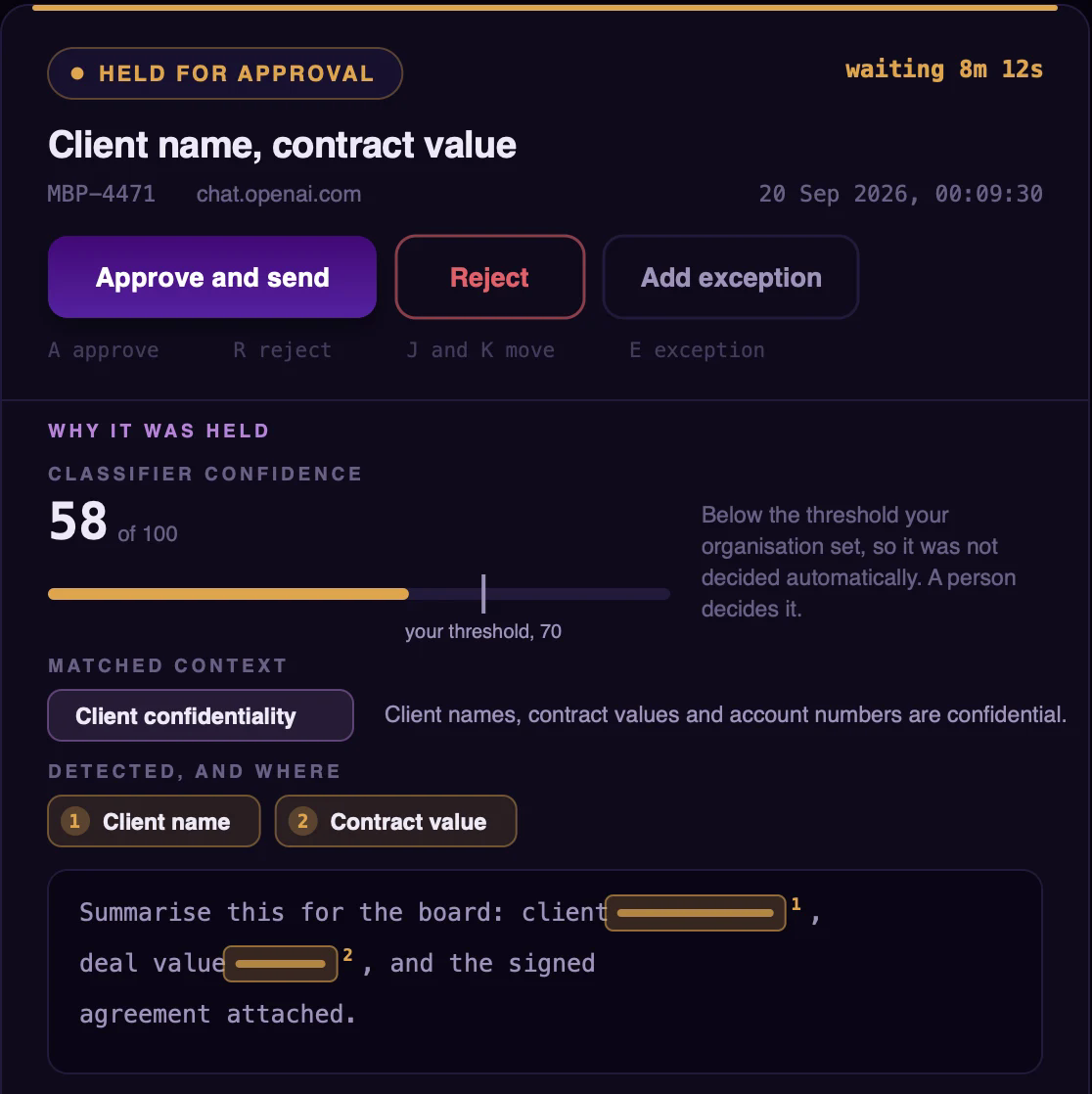
Every request the agent forwards, with what was found in it and how it was decided. Anything the engine wasn’t sure about waits at the top for someone on your team to approve or reject, and IT hears about every block.
What does our organisation treat as confidential?
Your team writes it down in plain sentences: client names and contract values, internal project names, source code from internal repositories. Each request is compared with those statements for what it means, not just for keywords. The screen also shows how often people overruled each statement, so one that keeps being overruled can be narrowed.
Internal project names
Needs attentionProject code names used internally are confidential.
- Matched
- 61
- Approved by a reviewer
- 57
- Rejected
- 4
Recent matches
- Summarise the project name1 status for the boardApproved
- Rewrite this supplier email about project name1Approved
- Draft release notes for project name1Rejected
Where does holding end and blocking begin?
You decide how sure the engine must be before it blocks a request outright rather than holding it for a person. The screen shows what a different setting would have done last month, so you choose with the numbers in front of you.
Confidence threshold
70- Something detected
- 260
- Held for a person
- 218
- Blocked
- 42
What have we chosen to allow?
A standing permission for one team, one AI service and one kind of content, such as marketing sending draft campaign copy to one service. Each shows how much traffic it lets through and when it runs out. Approving a held request can become an exception, which then covers later requests too.
Campaign copy to Gemini
- Team
- Marketing, 18 people
- AI service
- gemini.google.com
- May send
- Draft campaign copy, even with a client name1
- Used
- 412 times in 14 days
Without this exception
41 held for a person 3 blockedIs every device protected?
Each device reports whether it is protected, up to date and able to reach the engine. Devices that are degraded or offline are listed first, with the reason, so nothing is taken on trust.
FIN-LT-0142
Degraded- Heartbeat received2 min ago
- Policy Engine reachableCorporate network or VPN
- Network driver not loaded since a restartAgent sees no traffic
- AI service catalogueFetched on schedule
- Device identityBound to the security chip
What happened, and who did it?
Every decision, every change to policy and every sign-in, with the device and the AI service. The record stays in your environment.
- 09:41Approved and sent a held requestAdministrator7f3a…c21
- 09:38Held a request at confidence 58Policy Engine2b91…e04
- 09:38Forwarded a request to chat.openai.comFIN-LT-01422b91…e04
- 09:12Agent unreachableOPS-DT-003151c0…9aa
- 08:57Network driver stoppedFIN-LT-01420de4…71b
- 08:30Created the exception Campaign copy to GeminiAdministrator9c7e…3f2
- 08:02Signed inAdministratora4d8…6b0
Screens from the LLMGuard Policy Engine, shown with sample data
03Risk management
One blocked request is an event. A week of them from one person is a pattern
LLMGuard by HACS can also look at how each person has used AI over the past seven days, not just one request at a time. Each person gets a score, your risk team is alerted when a score climbs, and they can look into it without learning who the person is or what they wrote.
01A score for each person
One blocked request is usually a slip. The same person tripping the rules all week is something else, so LLMGuard by HACS turns each person’s recent AI use into a single score your risk team can see early. What counts, and where Medium and High begin, is for your organisation to decide.
02Alerts that become cases
When a score climbs, your risk team is alerted. Each alert is either closed as a false alarm or opened as a case, which keeps the notes, the linked alerts and the outcome together. When an auditor or a manager asks what happened, the answer is already written down.
03Patterns, not people
Analysts work with the pattern under a random name such as Person 4F2A, and never see what anyone wrote. Finding out who someone is needs an administrator’s approval, so looking into a pattern never turns into watching a person.
04Off until you decide
Scoring people is a decision for your organisation, not a default in the software. Risk management stays off until the person responsible for that decision switches it on, and the choice is recorded either way.
04What it covers
It works alongside your endpoint security and DLP tools
LLMGuard by HACS covers the one channel those tools weren’t built for: what your people send to AI services. It doesn’t try to be anything else, so here is exactly where it stops.
LLMGuard by HACS decides
Requests to AI services from
- Browsers
- IDE coding assistants
- Desktop AI apps
- Command-line agents
- Scripts
- SDK and API calls
Left to your other tools
LLMGuard by HACS doesn’t watch
- File servers
- SharePoint and OneDrive
- Personal Gmail
- General uploads in the browser
- Threats on the device, which is your endpoint security’s job
Limits worth knowing
- Managed devices
- The agent runs on Windows, macOS and Linux devices managed through Intune or similar.
- It needs your network
- Devices reach the Policy Engine on your network or over your VPN. When they can’t, your outage setting applies.
- It needs a server
- The Policy Engine runs on your hardware, to the requirements we give you.
05Security and privacy
Your requests stay in your environment. HACS sees none of them
Request content travels from the device to your Policy Engine and nowhere else until it has been allowed. The agent connects out to HACS only to authenticate and to download updates, and it carries none of your content.
HACS never connects into your network.
Your people
- Only traffic to AI services is opened. Banking, health, personal and every other kind of traffic stays sealed.
- Someone whose request is blocked is told so, in plain language, the moment it happens.
- Each device proves its own identity, so a stolen password or a copied disk can’t pose as it.
Who can see what
- Once a request is decided, what was written and attached is sealed, for administrators too. Access is granted case by case, and every access is recorded.
- Every console user has a role and sees only what their work needs. Risk analysts can’t change policy.
- When someone leaves, their account is switched off rather than deleted, so the history stays complete.
The record
- Every decision, every change to policy and every sign-in goes into an audit log your team can answer an auditor from.
- The log, the prompts and the documents stay in your environment. None of it is sent to HACS.
The LLMGuard Registries are the only part HACS hosts. They publish the signed catalogue of AI services that the agents download. Nothing travels the other way.
06Questions
Questions security teams ask
If yours isn’t here, email us and someone from our team will answer.
Email usconnect@hacsglobal.co
Does it replace our DLP?
No. LLMGuard by HACS covers one channel, what your people send to AI services, and works alongside your endpoint security and DLP tools. It doesn’t watch email, file servers, workspace tools such as SharePoint or OneDrive, personal Gmail or general uploads in the browser.
What does HACS receive from us?
The agent connects out to HACS to authenticate and to download a configuration file and the signed catalogue of AI services. No documents, prompts, logs or telemetry are sent to HACS, and HACS doesn’t connect into your network.
Where are the models trained?
On site, in your environment and on your own material, by our deployment team. Later training iterations happen on site too. We don’t describe the models or the training method publicly.
What happens when a device is off the network?
The agent needs to reach your Policy Engine for a decision, on your network or over your VPN. When it can’t, the setting you chose in advance applies: AI traffic either pauses or carries on without a decision.
What happens to a held request?
It isn’t sent. Someone on your team approves or rejects it in the Policy Engine, and the employee is told the result. If nobody decides, the request doesn’t go out. An approval can become policy, which then applies to later requests.
Can our administrators read what people sent?
Not by default. Once a request is decided, what was written and attached is sealed, for administrators too. Access is granted case by case, and every access goes into the audit log. We show how this works in a demonstration.
How accurate is it?
We don’t publish accuracy figures. The evaluation in your own environment is where you judge it, on your own requests, and anything the engine is unsure about is held for a person rather than decided automatically.
Will our applications notice?
Allowed requests, streamed replies included, behave as they did before. A blocked request gets a readable blocked-by-policy response, so applications don’t hang. No SDK, proxy settings or developer work is needed.
Which devices does it run on?
Windows, macOS and Linux devices, managed through device management such as Microsoft Intune. We confirm the details for your environment when we agree the plan.
How long does setup take?
It depends on your environment. We agree the plan, and what your team provides, before anything is installed.
What does it cost?
Pricing isn’t published yet. Two selected organisations will receive a pilot with HACS setup and evaluation fees waived. HACS also covers accommodation, and the customer provides the required hardware. Any other deployment expenses are discussed and agreed in writing before we start.
Early access
Pilots in India, the UAE and Qatar
Early-access organisations have LLMGuard by HACS installed in their own environment by our team, and evaluate it on their own requests.
What you’ll need
- Windows, macOS or Linux devices, managed through Intune or similar
- A server for the Policy Engine
- Devices that reach it on your network or VPN
- An IT contact for installation and coordination