AI usage control for Windows, macOS and Linux

Control what your organisation sends to AI

LLMGuard by HACS checks every request your devices send to an AI service. It runs on a server you own, and it stops anything carrying confidential information or intellectual property before the provider ever sees it.

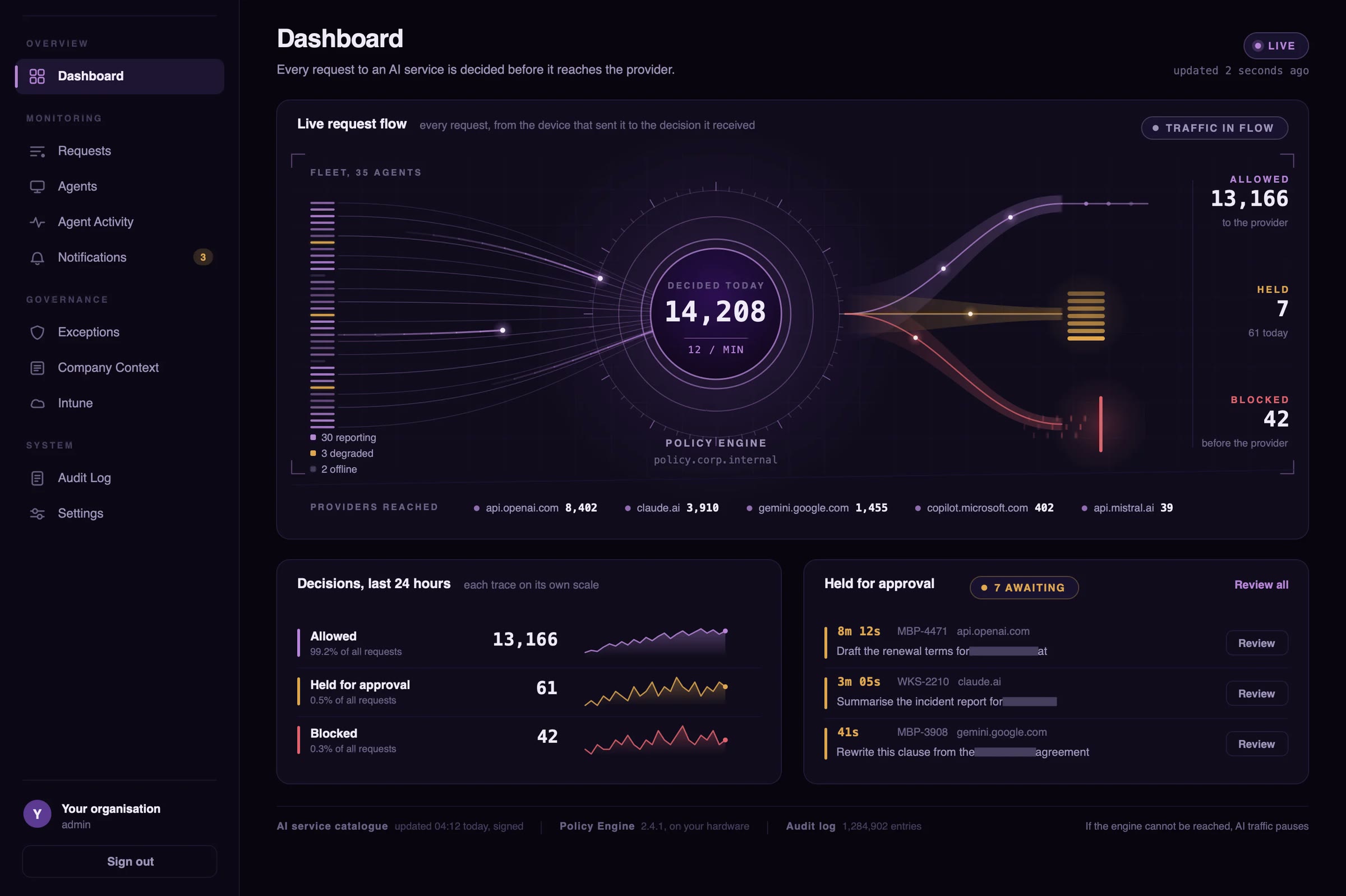
The LLMGuard Policy Engine dashboard. Requests from 35 enrolled devices converge on the engine and leave on three lanes: 13,166 allowed, 7 held for approval and 42 blocked before reaching the provider.
The LLMGuard Policy Engine dashboard, shown with sample data
Runs on
Your own servers
Multi-platform
Windows, macOS and Linux
Rolled out through
The Intune you already run
Checked
Before the request leaves

01Why this exists

Nobody did anything wrong

Someone on your team has a contract open and a deadline coming. They paste a clause into an AI assistant and ask it to check the indemnity wording. Four seconds later the answer is back, it’s a good one, and the work moves on.

The client’s name, the contract value and the account number went along with the question. An AI company holds them now.

Nobody broke a policy and nobody attacked you. Nothing in your security stack wrote it down either, because nothing was watching that route.

AI assistant New chat

Can you check the indemnity wording in this clause?

12.3 Indemnity. client name1 shall indemnify the Supplier against all losses arising from the Services, up to a total of contract value2. Payments under this clause are made to account account number3.

Pasted from Master Services Agreement.docx

1Client name2Contract value3Account number

Every other way out already has a guard

Email runs through a secure gateway. File servers have data loss prevention, SharePoint has sensitivity labels and USB drives have device control. You spent years putting those in place, they’re audited, and they work.

The chat box in an AI tool is the one route nobody built a control for.

  • EmailSecure gateway
  • File serversData loss prevention
  • SharePointSensitivity labels
  • Removable mediaDevice control
  • An AI chat boxNo controlAI provider
Company contextWritten in plain English

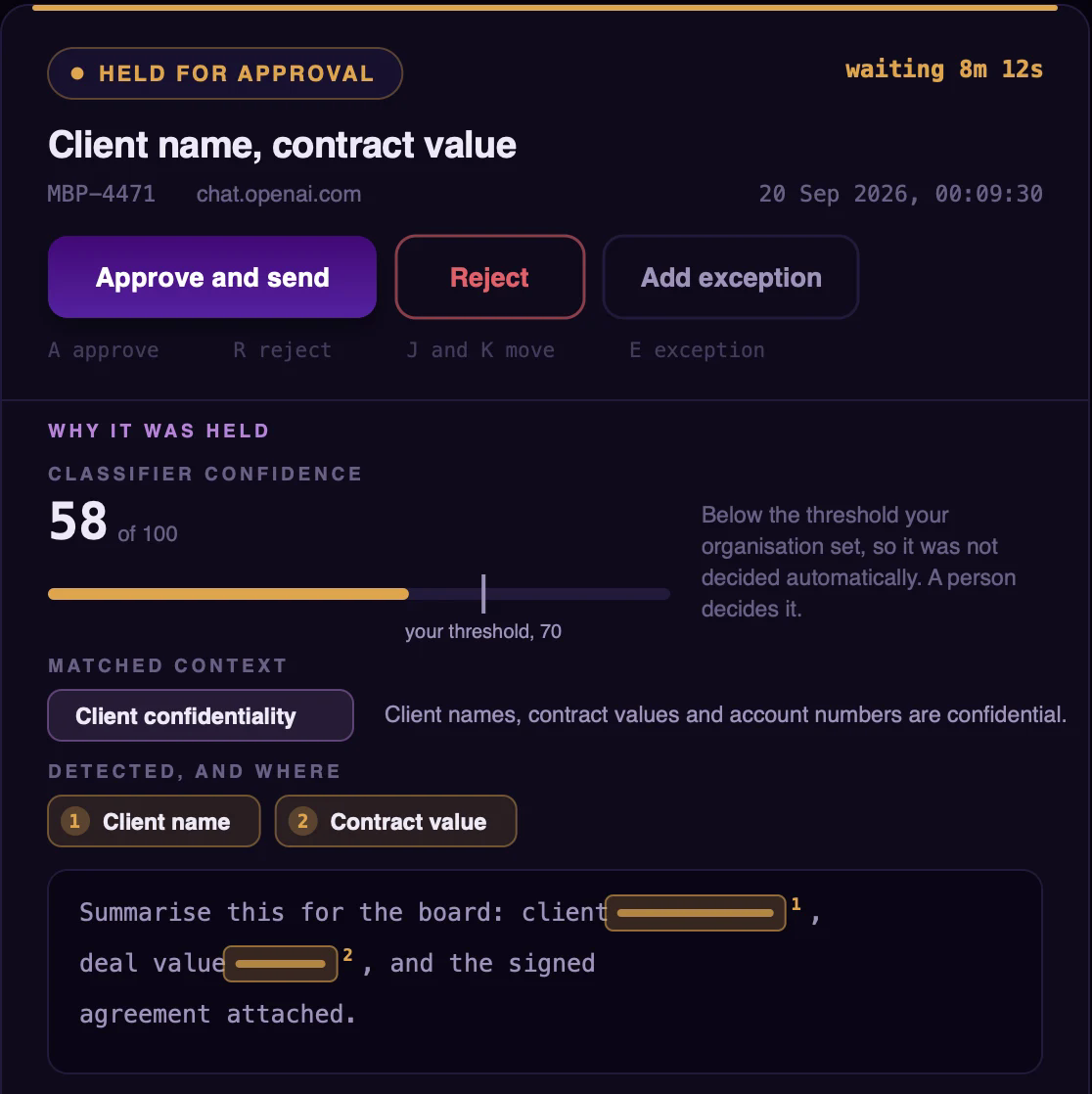
Client names, contract values and account numbers are confidential.

Applies to every device and every AI provider

You decide what confidential means

Write it down the way you would explain it to a new starter. LLMGuard by HACS reads each request for what it means against your statement, rather than hunting for keywords, so a client name it has never seen before is still recognised as a client name.

It works alongside your endpoint security and DLP tools, and covers the one route they weren’t designed for.

02Where it runs

The Policy Engine runs on your hardware. Every decision is made there

To check a request against your rules, something has to read what’s in it. That happens in the LLMGuard Policy Engine, which we install on a server in your environment, and nowhere else.

The agent on each device has a narrower job. It spots traffic heading to AI services, hands it to the engine and carries out whatever the engine decides.

How a block plays out. The device passes the request to your engine, the engine decides, and only allowed requests go on to the AI service.

What travels, and where

Device Policy Engine
The content of each AI request, with anything attached to it
Policy Engine device
The decision: allowed, held or blocked
Out to the AI provider
Allowed requests, and nothing else
Out to HACS
Authentication, a configuration file and the signed catalogue of AI services. None of your content travels this way, and HACS never connects into your network.

If a device can’t reach the engine, the answer is already set

Devices talk to the Policy Engine over your network or VPN. When one can’t, its AI traffic either pauses until the engine answers or carries on without a decision. You make that choice in advance.

What gets opened
Only traffic to AI services. Banking, health and personal traffic stays sealed.
On the record
Every decision is logged with the device, the service and a fingerprint of what was sent.
The Policy Engine Settings screen, When the engine cannot be reached. Two choices: AI traffic pauses, where requests to AI services are held on the device until the engine answers, and AI traffic continues, where requests go through without a decision.
Settings in the Policy Engine

03Every app, every AI

Keep every AI tool. Your rules decide what each one receives

People don’t only use AI in a browser tab. There are coding assistants inside the IDE, desktop apps, command-line agents and scripts calling an API directly.

LLMGuard by HACS sits beneath all of them, at the device’s network layer, and looks at what a request contains as well as where it’s going.

Where requests come from

  • Browsers
  • IDE coding assistants
  • Desktop AI apps
  • Command-line agents
  • Scripts
  • SDK and API calls

A browser plug-in would see only the first of these.

Blocked

Confidential content was found. The request never reaches the provider, the person sees a plain explanation instead of an app that hangs, and IT is notified.

What the person at the keyboard sees.

From a browserchat.openai.com
Can you check the indemnity wording in this clause? 12.3 Indemnity. client name1 shall indemnify the Supplier against all losses arising from the Services, up to a total of contract value2.

LLMGuard by HACSBlocked

This request was not sent. It contains information your organisation does not allow to leave for an AI service. IT has been notified.

More than 50 AI services
Recognised by the agent. New ones arrive by signed update, with nothing reinstalled on devices.
The service, not the cloud
It identifies the AI service itself, so business applications on the same cloud aren’t caught.
One policy
Set centrally, it applies to every device and every AI provider.
No application changes
No SDK, no proxy settings and no developer work.

Early access · India, the UAE and Qatar

Try it inside your own environment

Apply for an on-premises pilot. Our team installs LLMGuard by HACS on your hardware and supports the evaluation, which runs on your own requests.